This is not a competition between Apples and Oranges, but a more contextual comparison of real life scenarios between Angular and Svelte, instead of the quite bland, and scientific comparison I found online. I am the frontend developer, caught in the middle.
The comparison is based on the following topics:
- Implementation of shared concepts: forms, projection, error handling, routing ... etc
- What out-of-the-box options each support
- The ease of use from developer point of view
- Since all my projects are small to medium size apps, I have no interest in comparing build time, or code generated, nor DOM performance. I also avoid third-party component as a habit.
Svelte does not have routing feature out of the box, and allows developers to choose their own routing solution, which I find complete waste of time. Thus, this is only about Svelte Kit.
anchorDependency injection
This is probably the one most underestimated feature in Angular. Not that the concept itself is invented by Angular. Dependency injection has a lot of benefits, the one that stood out for me is how it was like the glue that placed a responsive client-side app together, in Laymen English.
Svelte is simple. It’s too simple. If you write a function in any file, it will be loaded on page initial load. If you call a function outside the hooks, it will be immediately invoked. Take for example, getting configurations and making them ready everywhere.
export const AppConfig = new MyAppConfigClass();This can be placed anywhere, whenever you use AppConfig the class will be invoked. Not. The class will be invoked even if nothing uses the AppConfig at first load. If that class relies on any other asynchronous operation, it will fail.
Dependency injection in its purest form is creating a static instance, and return it if already instantiated.
// the core seed of an injectable dependency
export class SomeThing() {
	static _instances: Something;
	static get RootSomething() {
		if (this._instance){
			return this._instance;
		}
		// initiate something the create an class instance, and save
		// this could be a process that calls a backend, awaits, or returns an observable state, a svele readable store
		this._instance = new Something();
	}
}
To use that in Svelte, it is as simple as:
// +page.svelte
const rootSomething = Something.RootSomething.someReadable; // coupd be a store readable
But this is plain. In Angular there is the concept of hierarchal injections. where you can decide which scope to instantiate in, and which instance to use. I have grown a special appreciation to that concept.
@Injectable({providedIn: 'root'})
export class Something() {
	constructor() {
		// first time instatiated, load it up
		this.SetList(['something']); // could be an observable
	}
}
To use that however, is a bit more boilerplate.
// page.ts
somethingService = inject(Something);

// on init
const someVar = this.somethingService.someObservable;

// or in template
`
  @let something$ = somethingService.someObservable | async;
`
This concept was quite helpful in injecting httpClient instances. Especially when you have multiple API instances. Using Axios client is popular with Svelte. But to make sure the API url is loaded from an external config file, rather than a dumb obsolete .env file (yes the concept is dumb and obsolete), you had to create a wrapper for the instance of the Axios client. In Angular, you can control the the sequence of events through the provideAppInitializer
// angular bootstrapper controls the sequence of boostrapping
bootstrapApplication(AppComponent, {
	 providers: [
		provideHttpClient(
			// ...
		),
		// here, inject the configuration startup
		provideAppInitializer(configFactory),
		// ...
	 ]
})
.catch((err) => console.error(err));
There is much more to dependency injection in Angular, it shines even more as the project scales up, and where microservices and multi-tenant are architectural decisions. Authoring libraries with enough flexibility to adjust behavior, using injection tokens, aligning SSR with the client side, and not having to worry about leakage of an instance, are just part of the bigger picture.
Check the old article on RxJS based state management in Angular.
anchorHttp Client
There is none in Sveltekit. They created a simple version of fetch that only works through their own load functions. And as I said above it fails to hydrate more often, because it has strict rules about matching DOM, and status of the Http call, including headers. If it does work however, it is quite slick.
Angular has its own powerful observable-based http client, with interception and hydration support. It can be injected and used anywhere, and there is no difference between client-side and server side. It works on either side. It hydrates more often than it fails, though I did encounter rare occasions where it failed. It is more forgiving but it might be with a performance cost.
anchorInterception
Here is how to properly intercept in Sveltekit.
// in sveltekit page.ts, with load function
export const load: PageLoad = async ({ fetch, params }) => {
	// this is a sveltekit fetch that hydrates, you need pass it along
	let brand = await GetBrand(fetch, params.slug);
	// ...
}
The fetch itself can be then used through a wrapper, like this
// GetBrand in http functions file
async GetBrand(svFetch, slug: string): Promise<IBrand> {

	// getSvelteFetch is the wrapper than handles interception
    const res = await getSvelteFetch(svFetch)(url, {
      method: 'POST',
      body: {slug: params},
    });
    // some response
    return mapResponse(res);
  }
Then in its own function:
// fetch.ts
export const getSvelteFetch = (svelteFetch, root = Config.apiRoot) => {

  return async (...args: any[]) => {

    const [url, options] = args;
	// prefix with root
    let _url = root + url;
    // add exact headers to hydrate properly, this is tricky as the token
    // is not always available on ssr
    const _token = 'what are you';
    const _authorization = _token ?  {'Authorization': `Bearer ${_token}`} : null;

    const headers: any = {
      'Content-Type': 'application/json',
      'Accept-Language': Res.language,
      ..._authorization
    };

	// log something if needed
    console.log(options.body);

    // prepare body with json stringify
    const _body = options.body ? { body: JSON.stringify(options.body) } : null;

     try {
      // then use svelte fetch passed 🤷
      const response = await svelteFetch(_url, {
        ...options,
        headers,
        ..._body
      });

      if (!response.ok) {
        // log errors
        console.log(response.status);
        response.json().then(json => {
          console.log(json);
        });
        return null;
      } else {
        return await response.json();
      }
    } catch (error) {
      console.log(error);
      return null;
    }
  };
};
This function gets intercepted on both client and server side. If you want to use Axios, it has its own interceptor, but no hydration out of the box.
In Angular, it is an out of the box interceptor function:
// in an http.ts file
export const MyInterceptorFn: HttpInterceptorFn = (req: HttpRequest<any>, next: HttpHandlerFn) => {
	// can inject any service in the app
   const authState = inject(AuthState);

   // using a static member of a service is also possible,
   // because in Angular you can
   // control how the app is loaded on bootstrap
   const url = ConfigService.Config.API.apiRoot + req.url;

   const adjustedReq = req.clone({ url: url, setHeaders: getHeaders(authState)});

   // this also allows a cleaner 401 refresh sequence
   return next(adjustedReq)
      .pipe(
	      // RxJS pipe work: examples:
         shareReplay(),
         map(response => mapData(response)),
         finalize(() => {
            // may be hide loaded her
         }),
	     // custsom pipe to console log
         debug(somemessage, 'p'),
         catchError((e) => {
            // log or throw back ...
            return throwError(() => e);
         })
    );
};
anchorHttp Context
Context that is passed into the interceptor are also supported in Angular HttpClient, and not supported at all in SvelteKit fetch. In Axios, the newest version, there is a way to pass context (finally). Here are two snippets for both worlds:
// Angular http.interceptor
// create a token
const SOMETHING = new HttpContextToken<string>(() => '');
// export a function to quickly set it (this isn't required, can be done in the service)
export const getSomethingContext = (src: string) => {
    return new HttpContext().set(SOMETHING, src);
};
// in the http interceptor:
export const MyInterceptorFn: HttpInterceptorFn = (req: HttpRequest<any>, next: HttpHandlerFn) => {
	// ... get context anywhere, example use of an injected loadService
	loaderService.show(req.context.get(SOMETHING));
	return next(adjustedReq).pipe(
		finalize(() => {
            loaderService.hide(req.context.get(LOADING_SOURCE));
         }),
	);
}

// in some service that needs context
 GetOrder(params): Observable<IOrder> {
	 // ... use httpClient injected in service
	 return this.http.post('url', params, {
		// set context
	      context: getSomethingContext('OrderLoad');
	    }).pipe(
	      map((response) => {
	        return mapResponse(response);
	      })
	    );
 }
In Axios client:
// first delcare the mapping in axios.d.ts
import 'axios';
declare module 'axios' {
  export interface AxiosRequestConfig {
    context?: string;
  }
}

// in an http.interceptor file
export function HttpInterceptor = (httpClient: AxiosInstance) => {

  // request handler
  httpClient.interceptors.request.use(  function (config) {
		  // access the context from config
		  Loader.show(config.context);
	  },
	  function (error) {
		  // access error.request?.config?.context
		  Loader.hide(error.request?.config?.context);
		  // ...
	  });
  // response handler
  httpClient.interceptors.response.use(
      function (response) {
			// access context from response.config.context
			Loader.hide(response.config?.context);
	  },
	  function (error: any) {
		  // access context from error.response.config.context
		 Loader.hide(error.response?.config?.context)
	  }
}

// then in the not-so-great Axios instance, create the instance and pass it to interceptor
export const httpClient = axios.create({
	baseURL: '/api'
});
HttpInterceptor(httpClient);


// now in our http request:
export const GetOrder(params): Promise<any> => {

	return await httpClient.post('url', params, {
	  context: 'OrderLoad'
	});
}
I prefer the Angular way. Which one do you prefer?
anchorReactivity
Runes of SvelteKits is provided by the $state object, and its sisters. In Angular that's signals. SvelteKit uses store for readables and writables. Angular uses observables. which relies on RxJS. I tried to create a state management simple class to handle creating lists, and client-side reactivity, and I could not get away with it in simple Runes. So I ended up installing RxJs. Then later resolved to Svelte store. It is doable, but wait till you need to concatMap multiple concurrent http calls. It is you, yourself, and JavaScript.
Here is an example, where search with debounce search is implemented, in pure JavaScript and in RxJS.
const search = writable<string>(null);

const keyword = derived(search,
	(k, set) => {
	  if (!k) return;

	  const timer = setTimeout(() => {
		const trimmed = k.trim();
		if (trimmed.length >= 3) {
		  set(trimmed);
		}
	  }, Config.Basic.debounceTime);
	  return () => clearTimeout(timer);
	},
	'',
);

const categories: Readable<ICategory[]> = derived([keyword, CategoryListState.RootList.stateList$],
([k, b]) => {
  if (!k) return;
  // this returns a store readable, that loads categories once per project
  return CategoryListState.RootList.FilterByKeyword(b, k.toLowerCase(), Config.Basic.suggestedSize);
	},
	[],
);
Compare that to RxJS
const search$ = new BehaviorSubject<string>(null);

const keyword$ = search$.pipe(
	filter((k) => !!k),
	debounceTime(Config.Basic.debounceTime),
	map((k) => k?.trim()),
	filter((k) => k?.length >= 3),
);
const categories = keyword$.pipe(
	switchMap((keyword) =>
		// this returns an observable
	  CategoryListState.RootList.FilterByKeyword(keyword.toLowerCase(), Config.Basic.suggestedSize),
));
RxJS is not luxury.
anchorTemplate imports
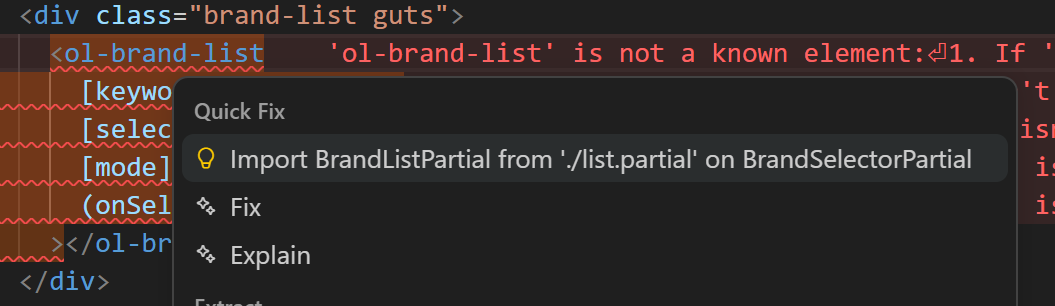
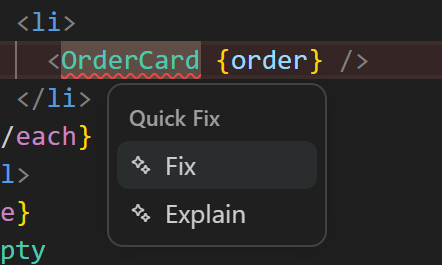
With the new version of SvelteKit, importing components and using them as classes has become easier, but once you import from a file, you can name your component tag anything, and vscode intellisense cannot decide where to import from if it isn't in shared folder, or lib folder. In Angular importing is the usual typescript import. The tag name is already defined in the component, making it impossible to make mistakes.
The two official VS code extensions used for both are: Angular Language Service, and Svelte for VS Code.
Angular: finds your component anywhere.
Svelte: Good luck
On the other hand, using imported artifacts in Svelte is much simpler, because the .svelte path is an HTML template, with script island. While Angular is a script file, with HTML template island. So here are how to use an enum in both versions:
<script lang="ts">
import { EnumSomething } from './models/something.ts';
</script>

{#if someProp === EnumSomething.Value}
It is directly available in template, as everything imported is.
{/if}
In Angular, the imports to the typescript, need to pass over as protected props to the template
// in Angular component class
@import { EnumSomething } from  from './models/something.ts';

// template
template: `@let someProp = myEnumSomething.Value`;

// class, must delare the import as a local property
readonly myEnumSomething = EnumSomething;
After a while, with Config keys, and constants defined elsewhere, and common functions, it becomes tedious.
anchorError handling
That is a long story, that will have to wait till next episode. In addition to forms, projection, routes, and some venting. 😴